Scope
This document will detail the steps necessary to restart Business Mind server.
Purpose
Reset Business Mind if the server is down or if Business Mind is exhibiting strange behaviors.
Steps
- Open VMWare Workstation.
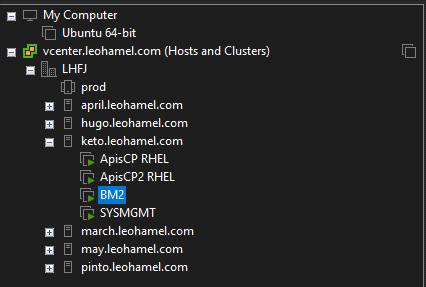
- On the left Library panel, navigate to keto.leohamel.com > BM2.
- Click on the key
 that says “Send Ctrl + Alt + Del to this virtual machine” to open the login screen.
- Login with LHFJit account.
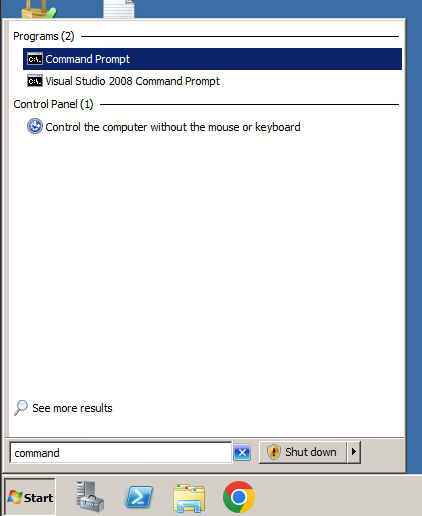
- Click on the Start menu. Search for Command Prompt and open it.
- Connect to MySQL as the user root with the command:
mysql -u root -pPASSWORD_GOES_HERE - After connecting, type in the command:
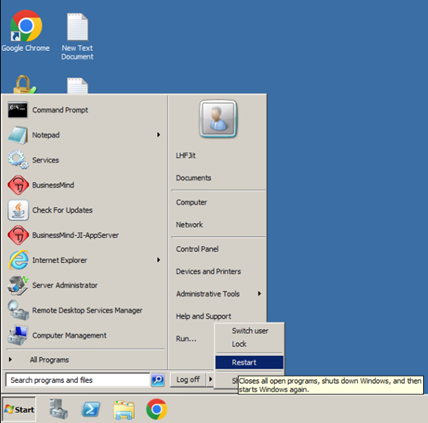
show processlist;to see if there are any pending tasks. If there are no Pending tasks, then proceed to the next step. Otherwise, recheck after a couple minutes and make sure all the tasks are done processing. - Restart the machine, as you would do with any other computer.
- If VMWare does not work, open vcenter.leohamel.com from the browser and do the same thing.